> ## Documentation Index
> Fetch the complete documentation index at: https://docs.siflow.cn/llms.txt
> Use this file to discover all available pages before exploring further.
# 创建 Kubernetes 集群
## 前提条件
在创建 Kubernetes 集群之前,请确保满足以下前提条件:
* 必须已创建 VPC 网络。如果尚未创建,请前往 **Cloud Networks > Virtual Private Cloud** 进行创建。有关配置说明,请参阅 VPC 私有网络指南。
* 必须在 VPC 网络中配置子网。
* 如果计划使用 RDMA 网络,请确保选择合适的可用区:IB RDMA 选择 **zone-a**,RoCE RDMA 选择 **zone-b**。请注意,虚拟机不支持 RDMA。
* 如果计划为集群挂载共享文件存储,请确保已提前创建文件系统。
## 操作步骤
1. 进入 **容器服务 > Kubernetes (CKS)** 管理控制台。
2. 在集群页面,单击右上角的 **创建 Kubernetes 集群**。
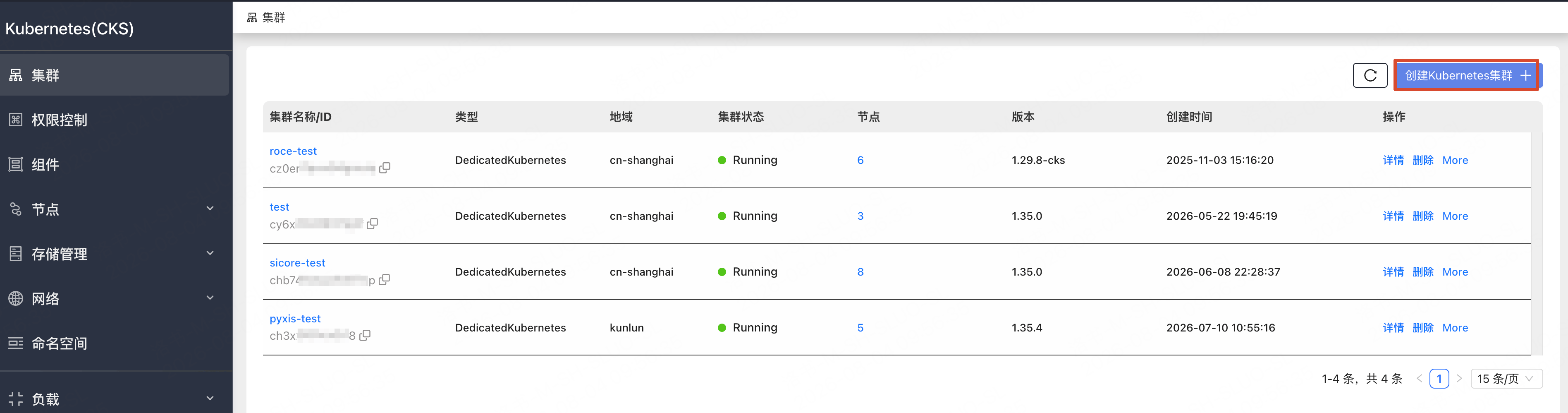 3. **集群配置**:配置集群名称、地域、Kubernetes 版本、VPC、网络设置和节点操作系统。然后单击 **下一步:节点配置**。
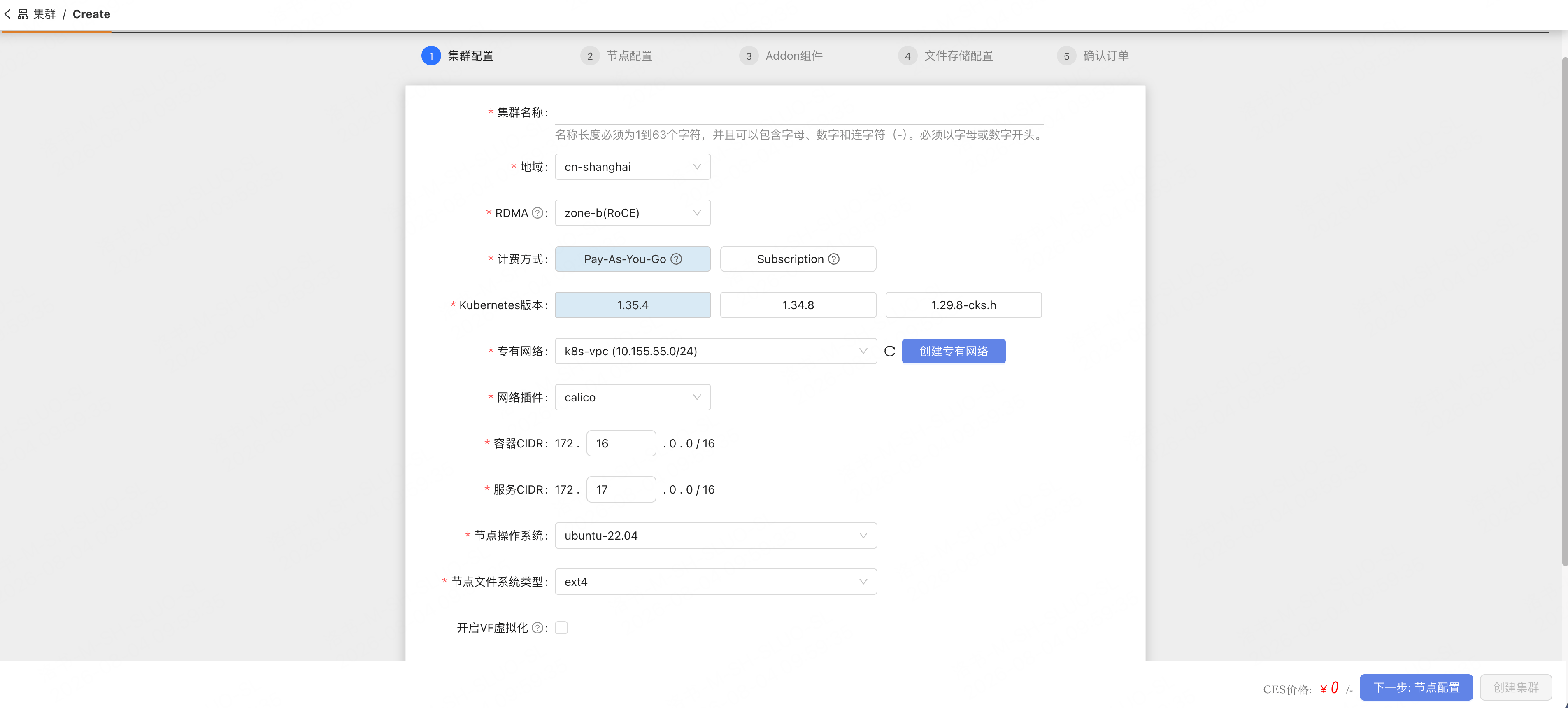 4. **节点配置**:配置控制平面和工作节点池的设置,包括实例类型、节点数量以及 GPU 驱动选项。然后单击 **下一步:Addon 组件**。
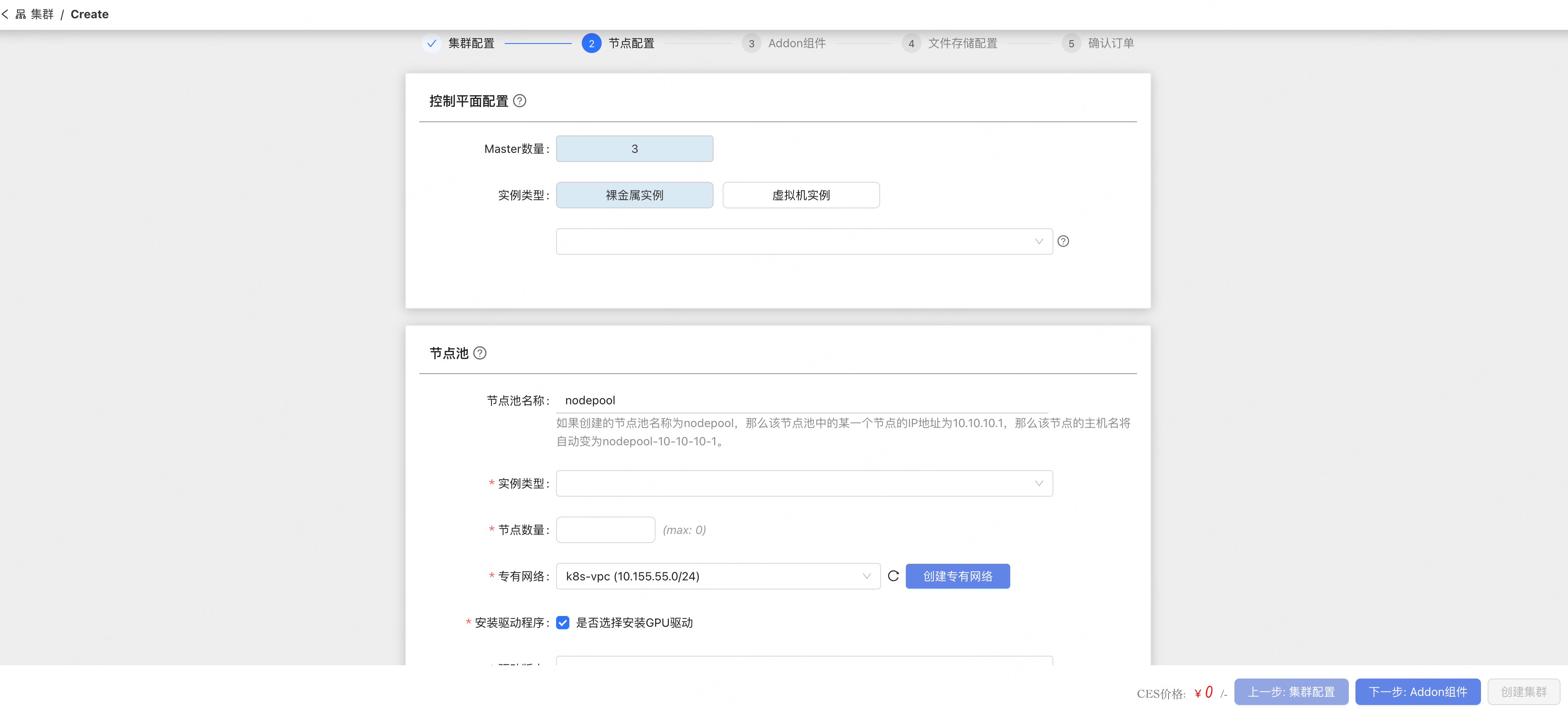 5. **Addon 组件**:选择要安装到集群上的可选插件组件(例如监控、GPU 插件、工作流引擎)。然后单击 **下一步:文件存储配置**。
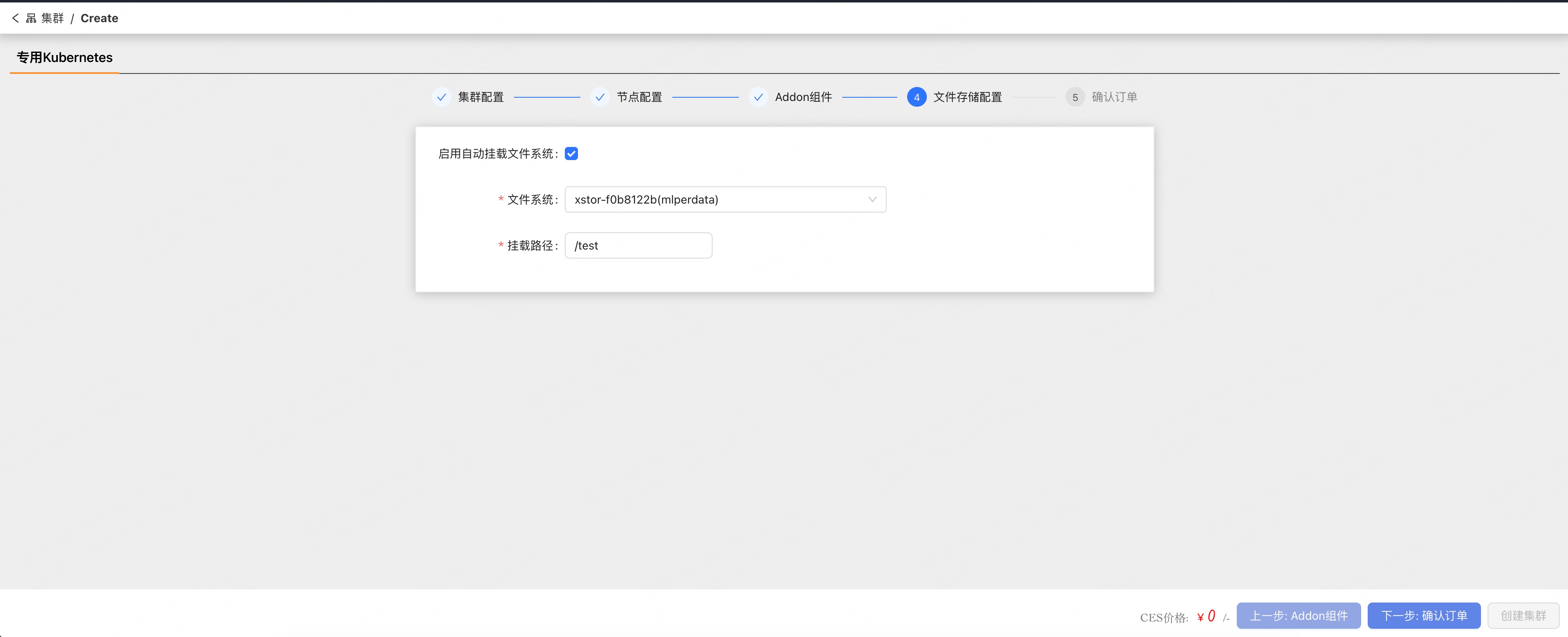
 6. **文件存储配置**:可选择启用文件系统自动挂载,并配置文件系统和挂载路径。然后单击 **下一步:确认订单**。
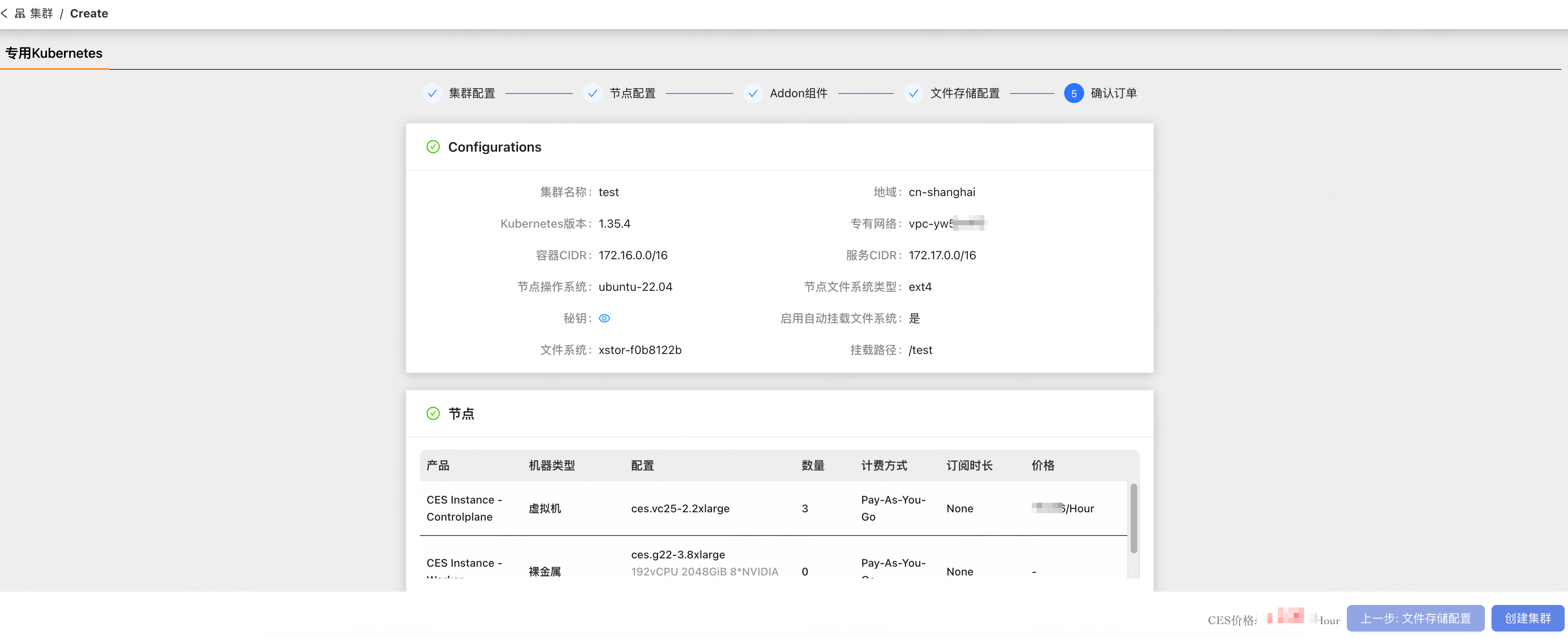
 7. **确认订单**:查看集群配置摘要和节点价格详情。确认无误后,单击 **创建集群**。
 > **注意:** 集群创建通常需要几分钟时间。请在集群列表中关注状态更新。当集群状态变为 `Running` 时,即表示创建完成。
## 配置说明
### 集群配置(Cluster Configurations)
| 参数 | 说明 |
| ---------------------- | ------------------------------------------------------------------------------------------------------------- |
| **Cluster Name** | 名称长度须为 1 到 63 个字符,可包含字母、数字和连字符(`-`)。必须以字母或数字开头。 |
| **Region** | 指定数据中心的地理位置(例如 `ap-southeast`、`us-west`、`us-east`)。会影响网络延迟,请选择距离用户最近的地域。集群创建后不可修改。 |
| **RDMA** | 根据可用区确定 RDMA 网络类型。`zone-a` 支持 **IB RDMA**;`zone-b` 支持 **RoCE RDMA**。虚拟机不支持 RDMA。 |
| **Billing Method** | **Pay-As-You-Go**:创建后使用资源并按小时付费。**Subscription**:预先付费购买并按月续订。 |
| **Kubernetes Version** | 要部署的 Kubernetes 控制平面版本(例如 `1.35.0`、`1.29.8-cks`、`1.29.8`)。 |
| **VPC** | 选择一个已有的 VPC 网络。集群节点将部署在该 VPC 内。如果没有可用的 VPC,请单击 **Create VPC**,在 Cloud Networks > Virtual Private Cloud 下创建一个。 |
| **Network Plugin** | 用于集群内 pod 网络的 CNI 插件。 |
| **Container CIDR** | 分配给集群内 pod 的 IP 地址范围。 |
| **Service CIDR** | 分配给集群内 Kubernetes 服务的 IP 地址范围。 |
| **Node OS** | 安装在集群节点上的操作系统镜像(例如 `ubuntu-22.04`)。 |
| **Node OS FsType** | 节点存储的文件系统类型。可选项:`ext4` 或 `xfs`。 |
### 节点配置(Node Configurations)
#### 控制平面配置(Controlplane Configurations)
生产集群使用裸金属服务器构建控制平面,而测试集群使用虚拟机。
| 参数 | 说明 |
| ----------------- | -------------------------------------------------------------------------------------------------- |
| **Master Number** | 控制平面(master)节点的数量。默认值为 `3`。 |
| **Instance Type** | 控制平面节点的实例类型。可选项:**Bare Metal Instance** 或 **Virtual Machine Instance**。从下拉列表中选择三个 CPU 节点以创建集群控制平面。 |
#### 节点池(Node Pool)
节点池允许您创建和管理一组具有相同实例类型的计算节点,并根据需要快速横向扩展。
| 参数 | 说明 |
| ---------------------- | ------------------------------------------------------------------------------------------------------------------------ |
| **NodePool Name** | 节点池的名称。默认值为 `nodepool`。每个节点的主机名会根据节点池名称和节点 IP 地址自动生成。例如,`nodepool` 节点池中 IP 为 `10.10.10.1` 的节点被命名为 `nodepool-10-10-10-1`。 |
| **Instance Type** | 工作节点的实例类型。从可用的 Bare Metal 或 Virtual Machine 实例类型中选择。详细规格见下文。 |
| **Node Quantity** | 节点池中包含的工作节点数量。 |
| **VPC** | 为节点池选择一个 VPC。如果没有可用的 VPC,请单击 **Create VPC**,在 Cloud Networks > Virtual Private Cloud 下创建一个。 |
| **Install GPU Driver** | 勾选此选项以在工作节点上安装 GPU 驱动。仅在使用 GPU 实例类型时适用。 |
| **GPU Driver Version** | 在启用 **Install GPU Driver** 时可用。选择要安装的 GPU 驱动版本。 |
### 实例类型与性能
| 产品类型 | 实例名称 | 规格 |
| --------------- | ------------------ | ------------------------------------------------------------------------------------------------------------------------------------------------------------------- |
| CES(Bare Metal) | ces.g11-7.8xlarge | CPU:Intel 8358(2.6Ghz, 32 Core)\* 2
> **注意:** 集群创建通常需要几分钟时间。请在集群列表中关注状态更新。当集群状态变为 `Running` 时,即表示创建完成。
## 配置说明
### 集群配置(Cluster Configurations)
| 参数 | 说明 |
| ---------------------- | ------------------------------------------------------------------------------------------------------------- |
| **Cluster Name** | 名称长度须为 1 到 63 个字符,可包含字母、数字和连字符(`-`)。必须以字母或数字开头。 |
| **Region** | 指定数据中心的地理位置(例如 `ap-southeast`、`us-west`、`us-east`)。会影响网络延迟,请选择距离用户最近的地域。集群创建后不可修改。 |
| **RDMA** | 根据可用区确定 RDMA 网络类型。`zone-a` 支持 **IB RDMA**;`zone-b` 支持 **RoCE RDMA**。虚拟机不支持 RDMA。 |
| **Billing Method** | **Pay-As-You-Go**:创建后使用资源并按小时付费。**Subscription**:预先付费购买并按月续订。 |
| **Kubernetes Version** | 要部署的 Kubernetes 控制平面版本(例如 `1.35.0`、`1.29.8-cks`、`1.29.8`)。 |
| **VPC** | 选择一个已有的 VPC 网络。集群节点将部署在该 VPC 内。如果没有可用的 VPC,请单击 **Create VPC**,在 Cloud Networks > Virtual Private Cloud 下创建一个。 |
| **Network Plugin** | 用于集群内 pod 网络的 CNI 插件。 |
| **Container CIDR** | 分配给集群内 pod 的 IP 地址范围。 |
| **Service CIDR** | 分配给集群内 Kubernetes 服务的 IP 地址范围。 |
| **Node OS** | 安装在集群节点上的操作系统镜像(例如 `ubuntu-22.04`)。 |
| **Node OS FsType** | 节点存储的文件系统类型。可选项:`ext4` 或 `xfs`。 |
### 节点配置(Node Configurations)
#### 控制平面配置(Controlplane Configurations)
生产集群使用裸金属服务器构建控制平面,而测试集群使用虚拟机。
| 参数 | 说明 |
| ----------------- | -------------------------------------------------------------------------------------------------- |
| **Master Number** | 控制平面(master)节点的数量。默认值为 `3`。 |
| **Instance Type** | 控制平面节点的实例类型。可选项:**Bare Metal Instance** 或 **Virtual Machine Instance**。从下拉列表中选择三个 CPU 节点以创建集群控制平面。 |
#### 节点池(Node Pool)
节点池允许您创建和管理一组具有相同实例类型的计算节点,并根据需要快速横向扩展。
| 参数 | 说明 |
| ---------------------- | ------------------------------------------------------------------------------------------------------------------------ |
| **NodePool Name** | 节点池的名称。默认值为 `nodepool`。每个节点的主机名会根据节点池名称和节点 IP 地址自动生成。例如,`nodepool` 节点池中 IP 为 `10.10.10.1` 的节点被命名为 `nodepool-10-10-10-1`。 |
| **Instance Type** | 工作节点的实例类型。从可用的 Bare Metal 或 Virtual Machine 实例类型中选择。详细规格见下文。 |
| **Node Quantity** | 节点池中包含的工作节点数量。 |
| **VPC** | 为节点池选择一个 VPC。如果没有可用的 VPC,请单击 **Create VPC**,在 Cloud Networks > Virtual Private Cloud 下创建一个。 |
| **Install GPU Driver** | 勾选此选项以在工作节点上安装 GPU 驱动。仅在使用 GPU 实例类型时适用。 |
| **GPU Driver Version** | 在启用 **Install GPU Driver** 时可用。选择要安装的 GPU 驱动版本。 |
### 实例类型与性能
| 产品类型 | 实例名称 | 规格 |
| --------------- | ------------------ | ------------------------------------------------------------------------------------------------------------------------------------------------------------------- |
| CES(Bare Metal) | ces.g11-7.8xlarge | CPU:Intel 8358(2.6Ghz, 32 Core)\* 2
MEM:2TB
Disk:2\*960GB (raid 1)
GPU:8\*NVIDIA A100-pcie-80G
Network:25Gbps\*2RDMA: 2\*200Gbps |
| | ces.g20-3.8xlarge | CPU: Intel 8468(2.1Ghz, 48Core) \* 2
MEM: 2T
Disk: 960G \*2 (raid 1)
GPU: H100-nvlink-80G\*8
Network: 25Gbps\*2 RDMA: NDR 400Gbps \* 4 |
| | ces.c23-2 | CPU:Intel 6430(2.1Ghz,32 Core) \* 2
MEM: 64G DDR5\*32
DISK: SSD960G\*2(raid1)
Network: 25Gbps\*2RDMA: HDR 200Gbps \* 2 |
| | ces.g14-2.8xlarge | CPU:Intel 8358(2.6Ghz, 32 Core)\* 2
MEM:2TB
Disk:2\*960GB (raid 1)
GPU:NVIDIA A100-nvlink-80G \* 8
NetWork:25Gbps\*2RDMA: HDR 200Gbps \* 2 |
| VIM Instance | ces.vc23-2.2xlarge | 8 vCPU, 128G Memory, 200G Disk |
| | ces.vc23-2.4xlarge | 16 CPU, 256G Memory, 200G Disk |
| | ces.vc23-2.8xlarge | 32 CPU, 512G Memory, 200G Disk |
| | | |
### 插件组件(Addon Components)
选择要随集群一起部署的可选插件组件。
| 组件 | 说明 |
| ------------------------------ | --------------------------------------------------- |
| **vmo** | victoria-metrics-operator——管理 Victoria Metrics 监控栈。 |
| **prometheus-monitoring-cks** | 用于 Kubernetes 监控的 Prometheus。 |
| **kruise** | kruise——面向 Kubernetes 的增强型工作负载管理。 |
| **volcano** | volcano——面向高性能工作负载的批量调度系统。 |
| **navix-nodegroup-controller** | navix-nodegroup-controller——管理节点组资源。 |
| **training-operator** | training-operator——管理分布式机器学习训练任务。 |
| **argo-workflow** | argo-workflow——用于在 Kubernetes 上编排并行任务的工作流引擎。 |
| **rdma-device-plugin** | 适用于 IB 集群的 RDMA 设备插件。 |
| **nvidia-device-plugin** | 向 Kubernetes 工作负载暴露 NVIDIA GPU 资源。 |
| **cks-label-manager** | 管理 CKS 集群中的节点标签。 |
### 文件存储配置(FileStorage Configurations)
| 参数 | 说明 |
| -------------------------------------------- | ------------------------------------------ |
| **Enable to mount filesystem automatically** | 勾选此选项以自动将共享文件系统挂载到所有集群节点。 |
| **FileSystem** | 在启用自动挂载时可用。选择要挂载的文件系统。 |
| **Mount Path** | 在启用自动挂载时可用。指定文件系统在每个节点上挂载的目录路径(例如 `/tmp`)。 |
### 确认订单(Confirm Order)
在提交前检查所有已配置的设置。确认页面显示两个部分:
**Configurations** —— 集群设置摘要,包括:
| 字段 | 示例 |
| ---------------------------------------- | ---------------- |
| Cluster Name | `smchen-test` |
| Region | `us-east` |
| Kubernetes Version | `1.35.0` |
| VPC | `vpc-o30jjx2h` |
| Container CIDR | `172.16.0.0/16` |
| Service CIDR | `172.17.0.0/16` |
| Node OS | `ubuntu-22.04` |
| Node OS FsType | `xfs` |
| Enable to mount filesystem automatically | `Yes` |
| FileSystem | `xstor-10bd9db1` |
| Mount Path | `/tmp` |
**Nodes** —— 节点定价摘要,包括:
| 字段 | 说明 |
| --------------------- | ---------------------------------------------------------- |
| Product | 节点角色(例如 CES Instance - Controlplane、CES Instance - Worker) |
| Machine Type | Bare Metal 或 Virtual Machine |
| Configuration | 实例类型与硬件规格 |
| Quantity | 节点数量 |
| Billing Method | Pay-As-You-Go 或 Subscription |
| Subscription Duration | Subscription 计费的时长(Pay-As-You-Go 时为 None) |
| Price | 每小时的预估费用 |
确认无误后,单击 **Create Cluster** 开始置备。