> ## Documentation Index
> Fetch the complete documentation index at: https://docs.siflow.cn/llms.txt
> Use this file to discover all available pages before exploring further.
# Cline
> 了解如何在 Cline 中配置 OpenAI Compatible provider、API Key 和 Base URL,接入 siflow endpoint,让 AI coding agent 使用算秩模型。
Cline 是一个与命令行和代码编辑器协同工作的 AI 助手。它使用大语言模型驱动的 agent-style 编程方式,可以将复杂开发任务拆解成步骤,并以可控方式执行。
Cline 支持以下能力:
* 创建和编辑文件,并通过模型驱动的操作浏览大型项目。
* 使用浏览器并运行终端命令,每次执行前都会请求您的确认。
* 通过 Model Context Protocol(MCP)扩展能力,包括接入自定义工具。
* 与沙箱脚本不同,Cline 提供可视化界面,并会在每次文件修改或终端命令执行前请求确认,因此 AI 辅助开发过程更安全、可控。
Cline 的使用场景如下:
* 分步骤完成多步重构或功能开发。
* 使用自然语言探索和修改代码库。
* 自动化重复性开发流程,例如生成测试、更新配置,并保留人工确认环节。
## 配置
以下步骤以 VS Code 中的 **Cline 3.20.1** 为参考;较新的版本可能略有差异。
### 1. 安装扩展
打开 VS Code(或受支持的编辑器),从扩展市场安装 **Cline** 扩展。
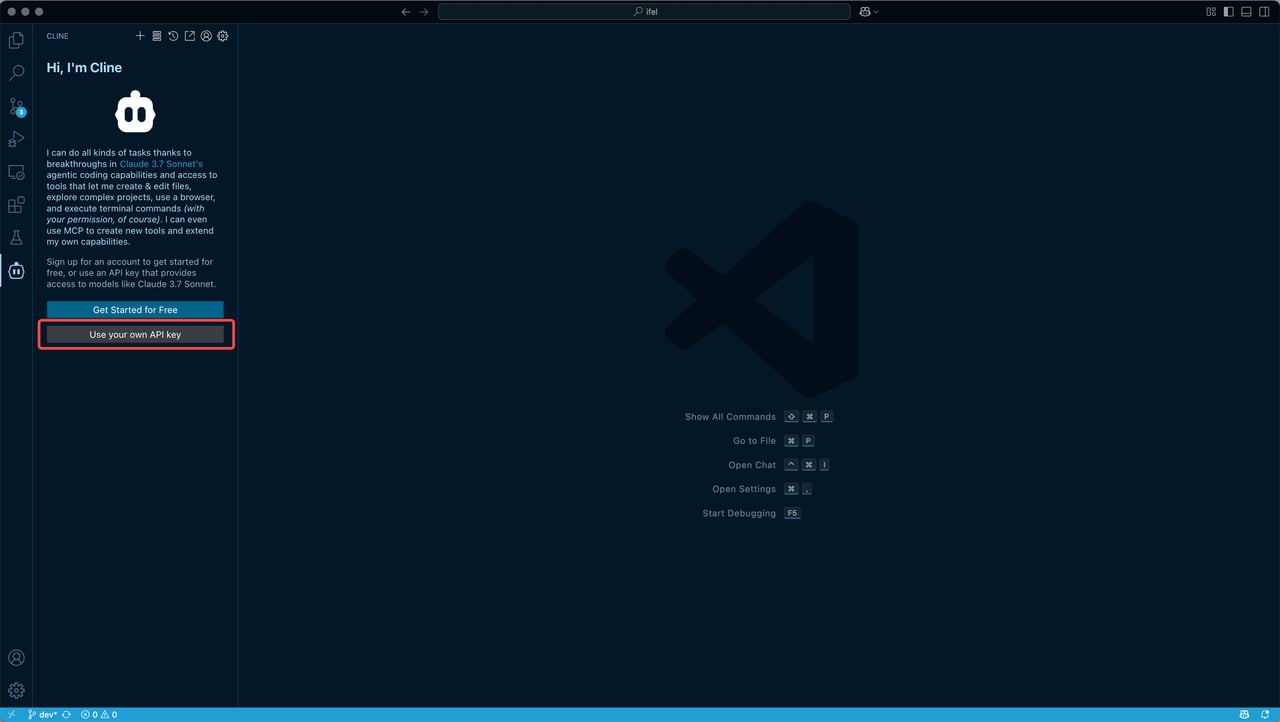 ### 2. 配置模型
在 Cline 设置中填写以下参数,其他模型参数请按需调整。
| 参数 | 说明 |
| ------------ | ---------------------------------------------------------------------------------------------------------------------------------------- |
| **Base URL** | `https://api.siflow.cn/model-api` |
| **API Key** | 您在 [API 密钥](https://console.siflow.cn/model-inference/api_keys) 页面创建的 API Key。请妥善保管 API Key,不要将其提交到版本控制系统。 |
| **Model ID** | 模型名称,请在 [模型广场](https://console.siflow.cn/model-inference/models) 页面查看模型详情。例如 `Qwen/Qwen3.5-397B-A17B`、`glm-5.2`、`MiniMaxAI/MiniMax-M2.7` |
### 2. 配置模型
在 Cline 设置中填写以下参数,其他模型参数请按需调整。
| 参数 | 说明 |
| ------------ | ---------------------------------------------------------------------------------------------------------------------------------------- |
| **Base URL** | `https://api.siflow.cn/model-api` |
| **API Key** | 您在 [API 密钥](https://console.siflow.cn/model-inference/api_keys) 页面创建的 API Key。请妥善保管 API Key,不要将其提交到版本控制系统。 |
| **Model ID** | 模型名称,请在 [模型广场](https://console.siflow.cn/model-inference/models) 页面查看模型详情。例如 `Qwen/Qwen3.5-397B-A17B`、`glm-5.2`、`MiniMaxAI/MiniMax-M2.7` |
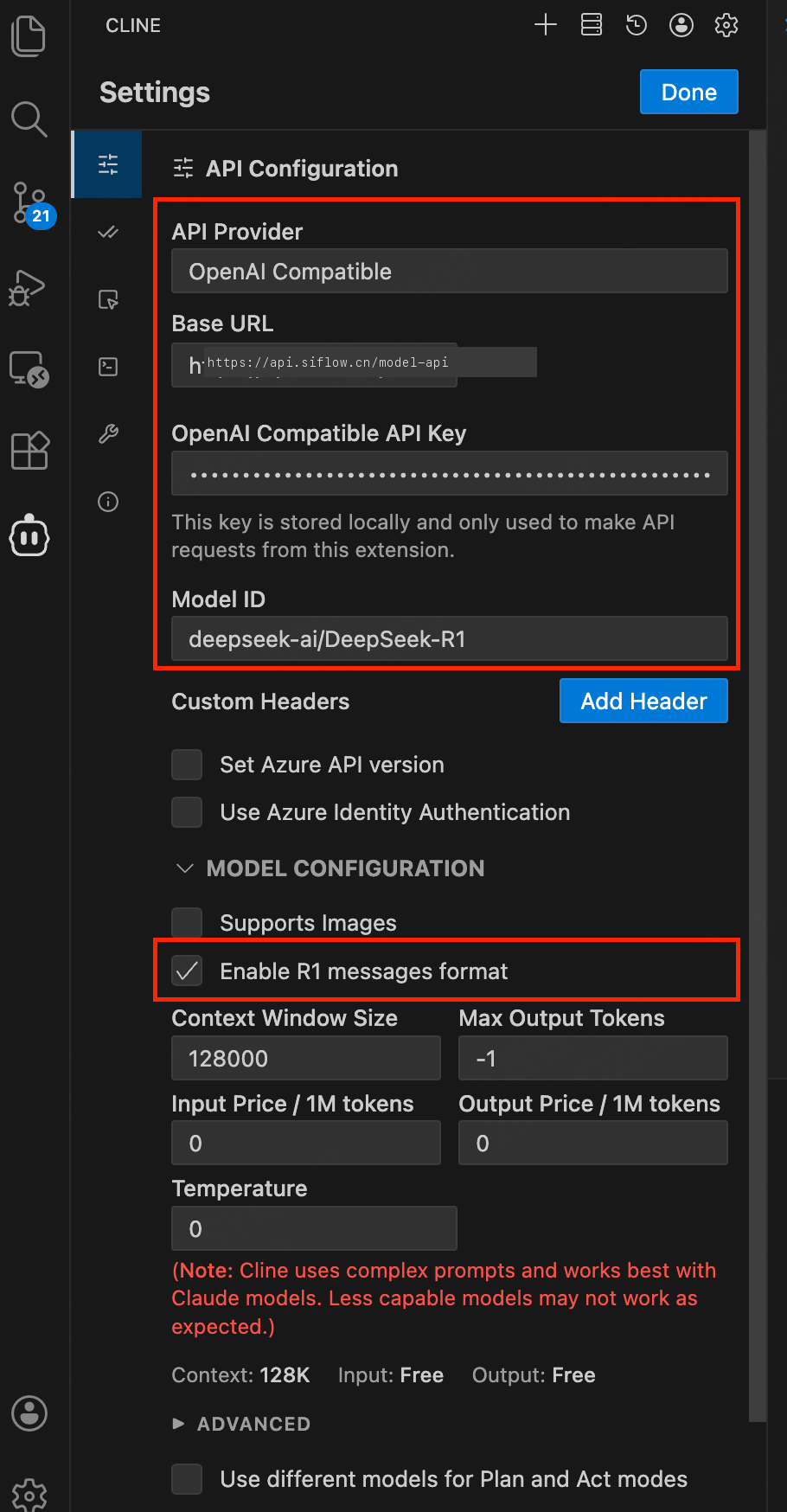 如果使用推理模型,例如 `Qwen/Qwen3-32B`,请在 **Model configuration** 中启用 **“Enable R1 messages format”**(或等效选项),确保客户端发送正确的消息格式。
对于复杂代码编辑或长周期任务,请选择上下文长度足够的模型;如适用,也应考虑模型是否支持 reasoning。
## 验证
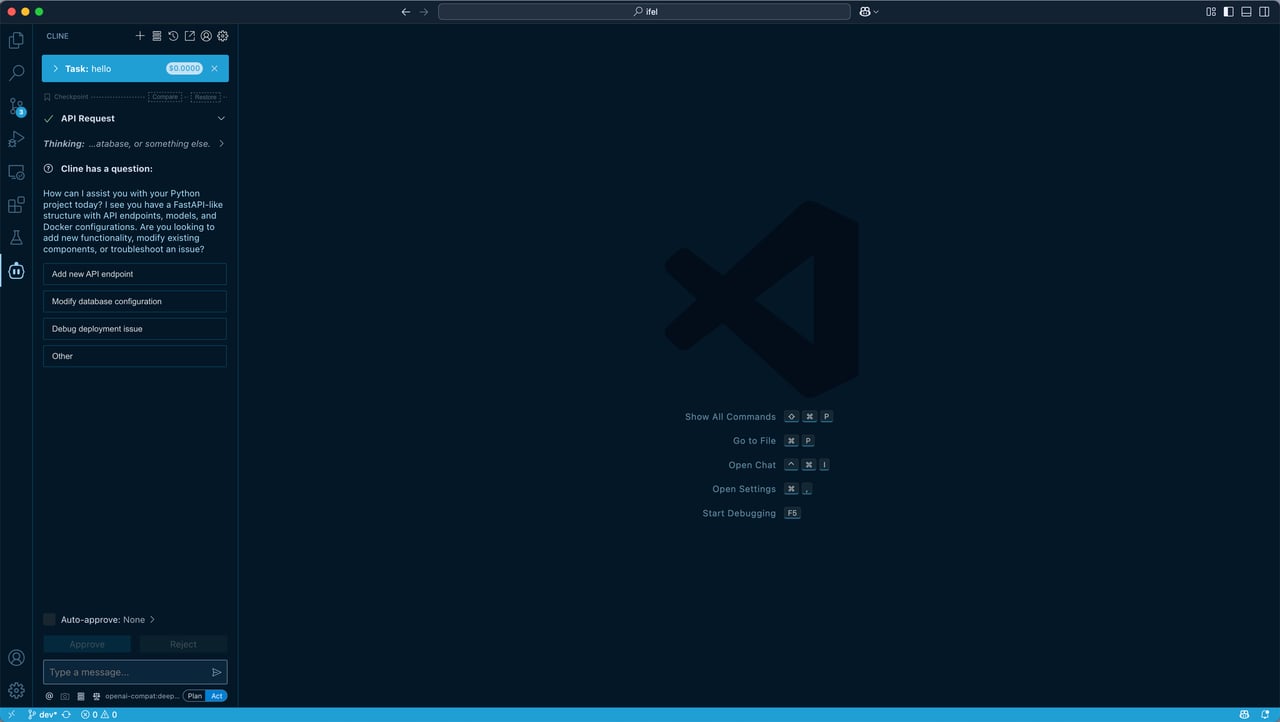
保存配置后,您可以用自然语言向 Cline 提交任务。Cline 会调用 siflow endpoint,并在获得您确认后执行文件和终端操作。
如果使用推理模型,例如 `Qwen/Qwen3-32B`,请在 **Model configuration** 中启用 **“Enable R1 messages format”**(或等效选项),确保客户端发送正确的消息格式。
对于复杂代码编辑或长周期任务,请选择上下文长度足够的模型;如适用,也应考虑模型是否支持 reasoning。
## 验证
保存配置后,您可以用自然语言向 Cline 提交任务。Cline 会调用 siflow endpoint,并在获得您确认后执行文件和终端操作。
 ## 常见问题
* **Cannot use checkpoints in Desktop directory**
当 workspace 位于 Desktop 文件夹下时,Cline 不允许使用 checkpoints。请从其他目录打开项目,例如 `~/Code`、`~/Projects` 或其他开发目录,避免该错误。
## 常见问题
* **Cannot use checkpoints in Desktop directory**
当 workspace 位于 Desktop 文件夹下时,Cline 不允许使用 checkpoints。请从其他目录打开项目,例如 `~/Code`、`~/Projects` 或其他开发目录,避免该错误。