> ## Documentation Index
> Fetch the complete documentation index at: https://docs.siflow.cn/llms.txt
> Use this file to discover all available pages before exploring further.
# Roo Code
> 了解如何在 Roo Code 中配置 OpenAI Compatible provider 和 Base URL,接入 siflow endpoint,让 VS Code 多模式 coding agent 使用算秩模型和 tool calling。
[Roo Code](https://github.com/RooCodeInc/Roo-Code) 是 Cline 的活跃 fork。它是一个面向 VS Code 的 multi-mode coding agent,包含 Code、Architect、Ask、Debug 等模式。它的 **OpenAI Compatible** provider 支持自定义 Base URL,因此可以运行在 siflow endpoint 上。
Roo Code 只使用原生 tool calling,没有 XML prompt fallback。请选择支持 OpenAI-compatible function calling 的模型。`glm-5.2` 支持该能力。完整列表和价格请参考 [模型广场](https://console.siflow.cn/model-inference/models)。
## 配置
请先在 [API 密钥](https://console.siflow.cn/model-inference/api_keys) 页面创建 API Key。
1. 单击侧边栏中的 Roo Code 图标,然后打开 **Settings (⚙️) → Providers**。
2. 在 **API Provider** 下选择 **OpenAI Compatible**。
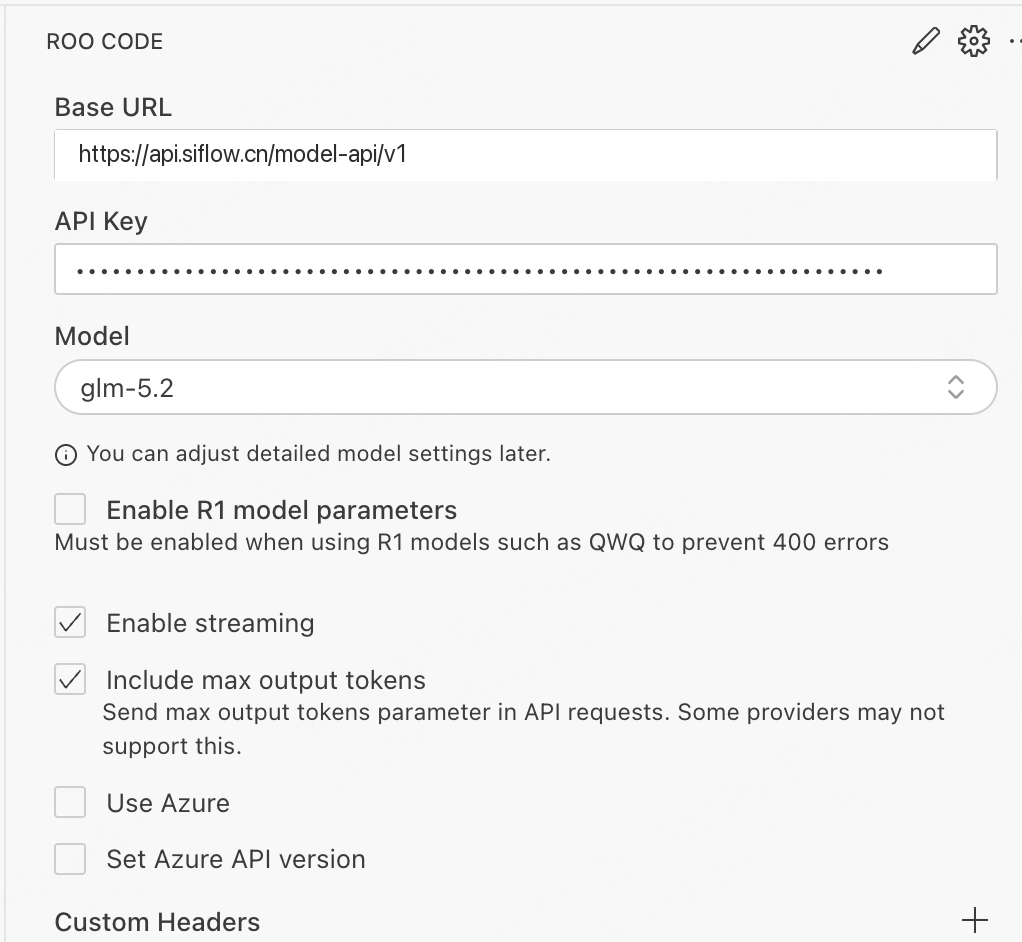
3. 填写所需字段。
| 参数 | 示例 |
| -------- | ------------------------------------------------------------------------------ |
| Base URL | `https://api.siflow.cn/model-api/v1` |
| API Key | 您在 [API 密钥](https://console.siflow.cn/model-inference/api_keys) 页面创建的 API Key。 |
| Model | `glm-5.2` |
4. 保持 **Enable streaming** 打开。
5. 保持 **Enable R1 model parameters** 关闭。它只适用于 QWQ 等 R1-style models。
6. 可选:在 model settings 下调整 **Context Window** 和 **Max Output Tokens**,使其与所选模型匹配。
如果 context window 设置超过所选模型的实际值,可能出现 context overflow。
7. 保存配置。
 ## 验证
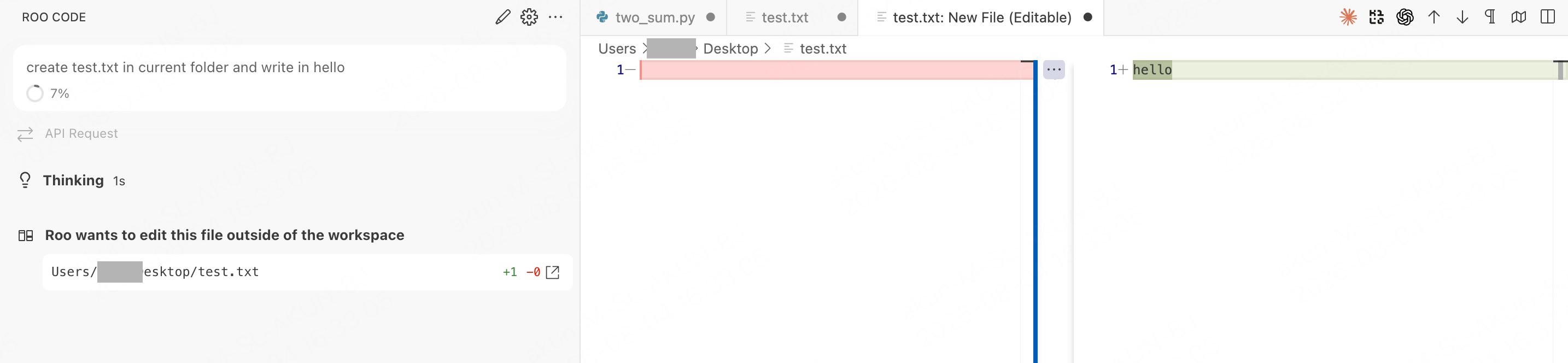
切换到 **Code** mode,给 Roo Code 一个任务,例如 "create test.txt in current folder and write in hello"。Roo Code 会规划任务并请求写入文件。批准操作后,如果正常回复,即表示连接成功。
## 验证
切换到 **Code** mode,给 Roo Code 一个任务,例如 "create test.txt in current folder and write in hello"。Roo Code 会规划任务并请求写入文件。批准操作后,如果正常回复,即表示连接成功。
 ## 常见问题
* **一直 thinking,随后报错 / 没有 tool calls**:模型不支持原生 tool calling。Roo Code 没有 XML fallback,请切换到支持该能力的模型。`glm-5.2` 可用。
* **404**:Base URL 以 `/v1` 结尾即可,不需要额外路径。
## 常见问题
* **一直 thinking,随后报错 / 没有 tool calls**:模型不支持原生 tool calling。Roo Code 没有 XML fallback,请切换到支持该能力的模型。`glm-5.2` 可用。
* **404**:Base URL 以 `/v1` 结尾即可,不需要额外路径。