> ## Documentation Index
> Fetch the complete documentation index at: https://docs.siflow.cn/llms.txt
> Use this file to discover all available pages before exploring further.

# 用户指南

## 创建服务

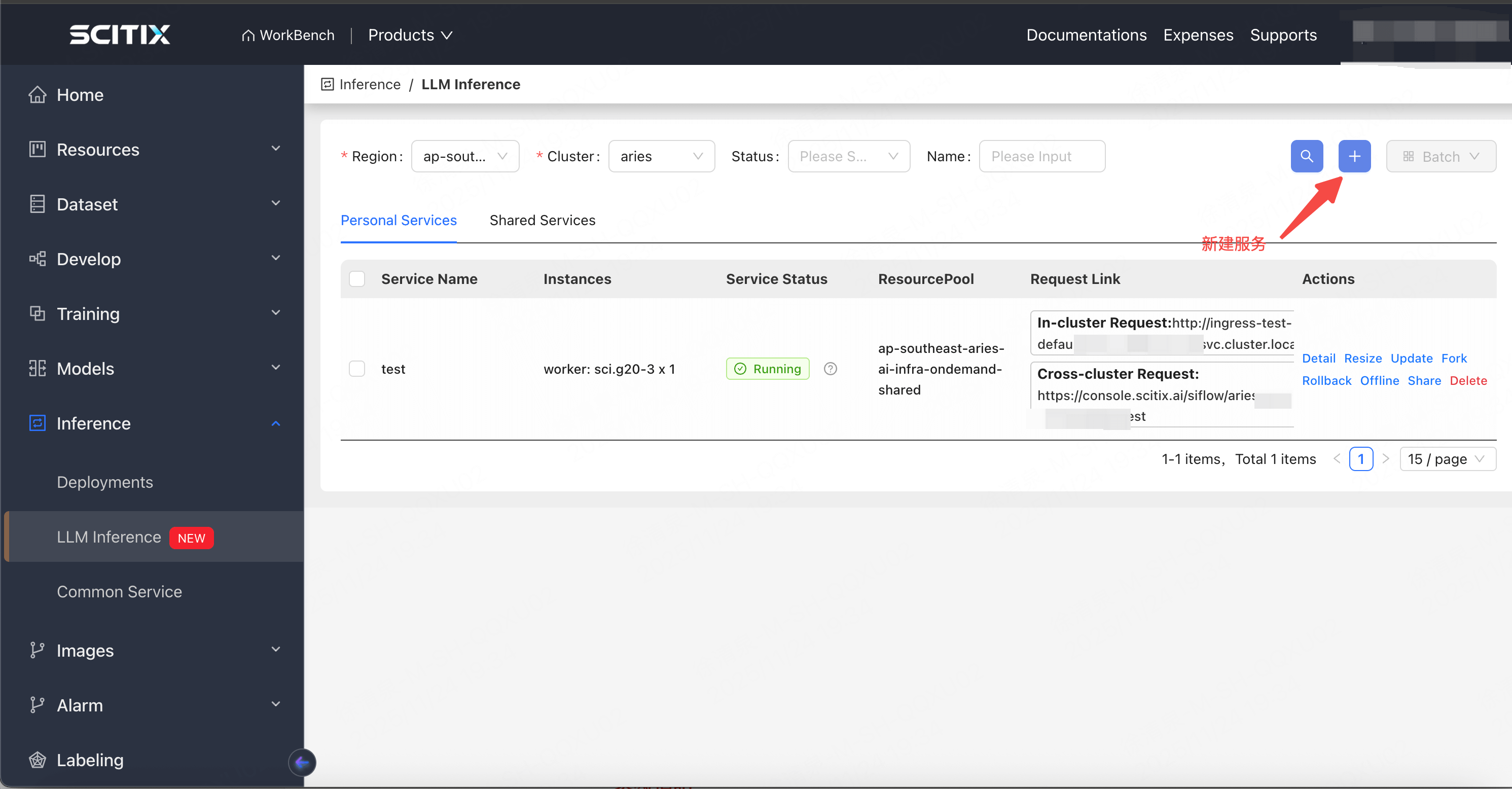
在 LLM Inference 模块中，点击 Create 进入创建表单

<img src="https://mintcdn.com/siflow/ntzNiCADsREJ4Kfh/products/siverse/media/llm/llm1.png?fit=max&auto=format&n=ntzNiCADsREJ4Kfh&q=85&s=dd84133f0b7499b1967757ccf9564b9f" alt="图片" width="2982" height="1556" data-path="products/siverse/media/llm/llm1.png" />

<img src="https://mintcdn.com/siflow/ntzNiCADsREJ4Kfh/products/siverse/media/llm/llm2.png?fit=max&auto=format&n=ntzNiCADsREJ4Kfh&q=85&s=69caf0e7ef33b9fcfa2cdd0c3b98856b" alt="图片" width="2988" height="1536" data-path="products/siverse/media/llm/llm2.png" />

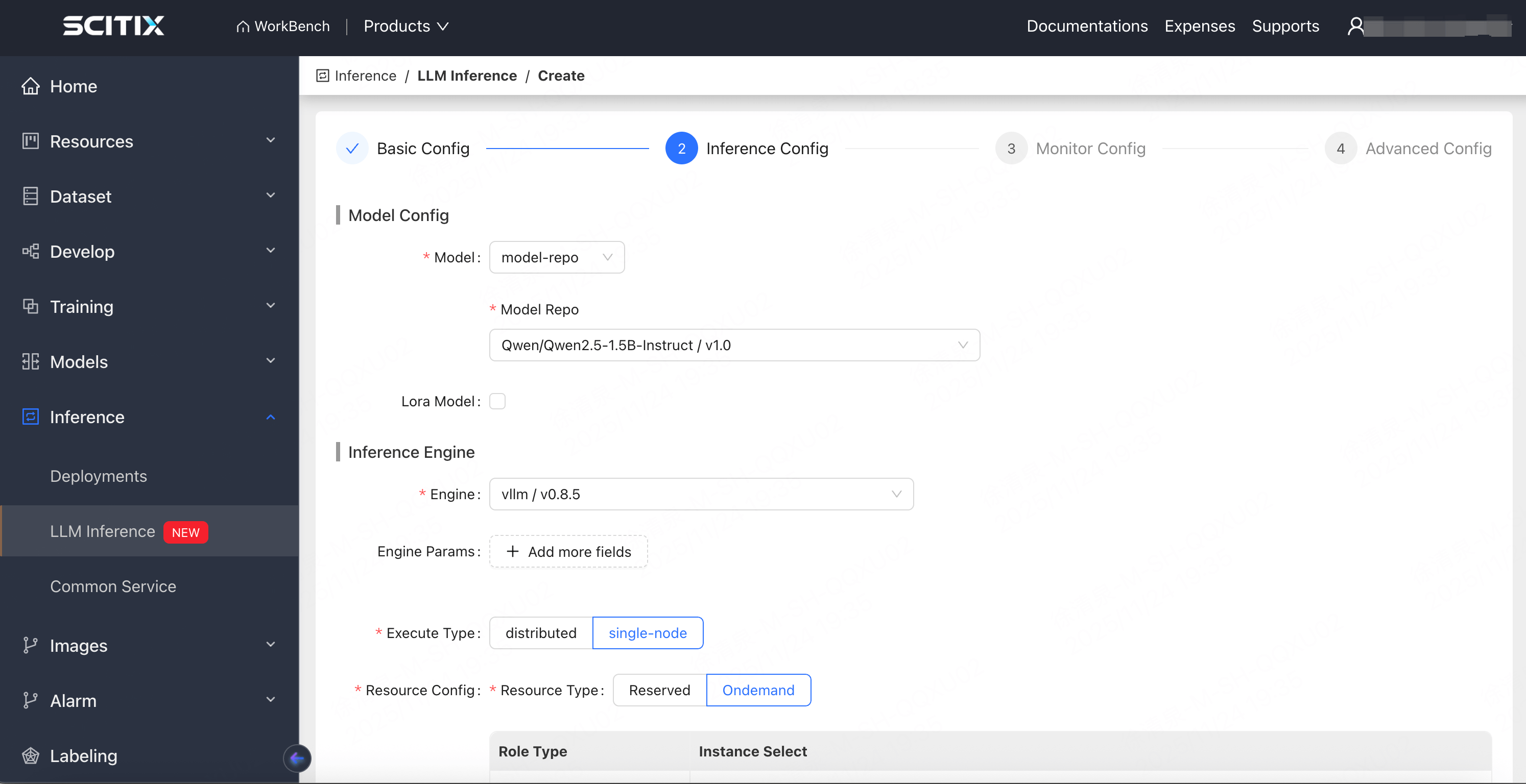
填写大模型服务配置，包含四个部分：基础配置、推理配置、监控配置和高级设置

### 参数说明

| 类别   | 配置名称             | 说明                                                                                                                                                                                                                                                   | 是否必填 |
| ---- | ---------------- | ---------------------------------------------------------------------------------------------------------------------------------------------------------------------------------------------------------------------------------------------------- | ---- |
| 基础配置 | name             | 账户下唯一                                                                                                                                                                                                                                                | ✅    |
|      | description      | 服务描述，可在此添加一些备注                                                                                                                                                                                                                                       | ❌    |
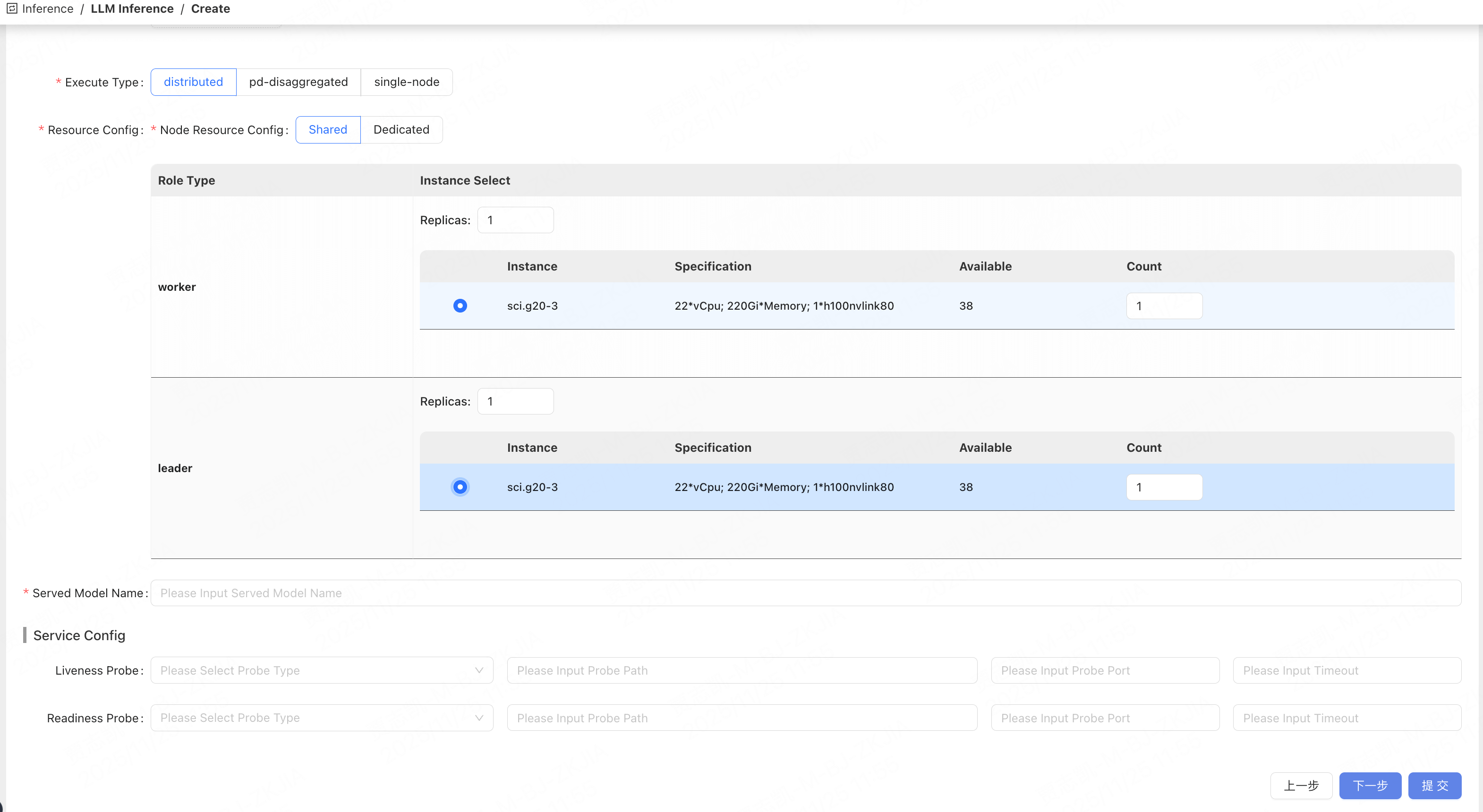
| 推理配置 | Model            | 模型来源：<br />1. hf：Hugging Face，需要填写模型名称和 Hugging Face token <br />2. volume：GPFS 存储卷，选择一个存储卷并填写挂载路径和模型路径 <br />3. model-repo：模型仓库，从模型仓库中选择公开或私有模型 <br />4. hostpath：本地路径【仅用于测试，即将废弃】<br />5. pvc：k8s 集群中的 PVC【仅用于测试，即将废弃】<br />6. oss：填写 bucket 和 key | ✅    |
|      | Inference Engine | vLLM 或 SgLang                                                                                                                                                                                                                                        |      |
|      | 健康检查配置           | Liveness：服务存活探针 <br />Readiness：服务就绪探针 <br />探针类型（tcp/http）<br />探针请求路径、探针请求端口、超时时长 <br />注意：此处应考虑服务初始化时间（模型加载、引擎初始化）。一般情况下，72B 参数以下的模型将超时设置为 60，400B 参数以上的模型设置为 300。请根据实际情况调整                                                                       |      |
| 高级配置 | 弹性伸缩             | 注意：检测间隔 2\*分钟 <br />1. 时间戳：伸缩的时间点，时间戳格式 <br />2. 副本数量：服务副本数量                                                                                                                                                                                         | ❌    |
|      | 服务注册             | Ingress 类型：k8s ingress 配置，添加额外的集群 ingress 解析规则                                                                                                                                                                                                       |      |
|      | 存储卷              | 服务挂载额外的 GPFS 存储卷                                                                                                                                                                                                                                     |      |
|      | 环境变量             | 为服务配置环境变量                                                                                                                                                                                                                                            |      |

## 查看与操作服务

### 服务列表
<img src="https://mintcdn.com/siflow/ntzNiCADsREJ4Kfh/products/siverse/media/llm/llm3.png?fit=max&auto=format&n=ntzNiCADsREJ4Kfh&q=85&s=a3300fab24407b7027524d9469fffbb3" alt="图片" width="3022" height="1546" data-path="products/siverse/media/llm/llm3.png" />

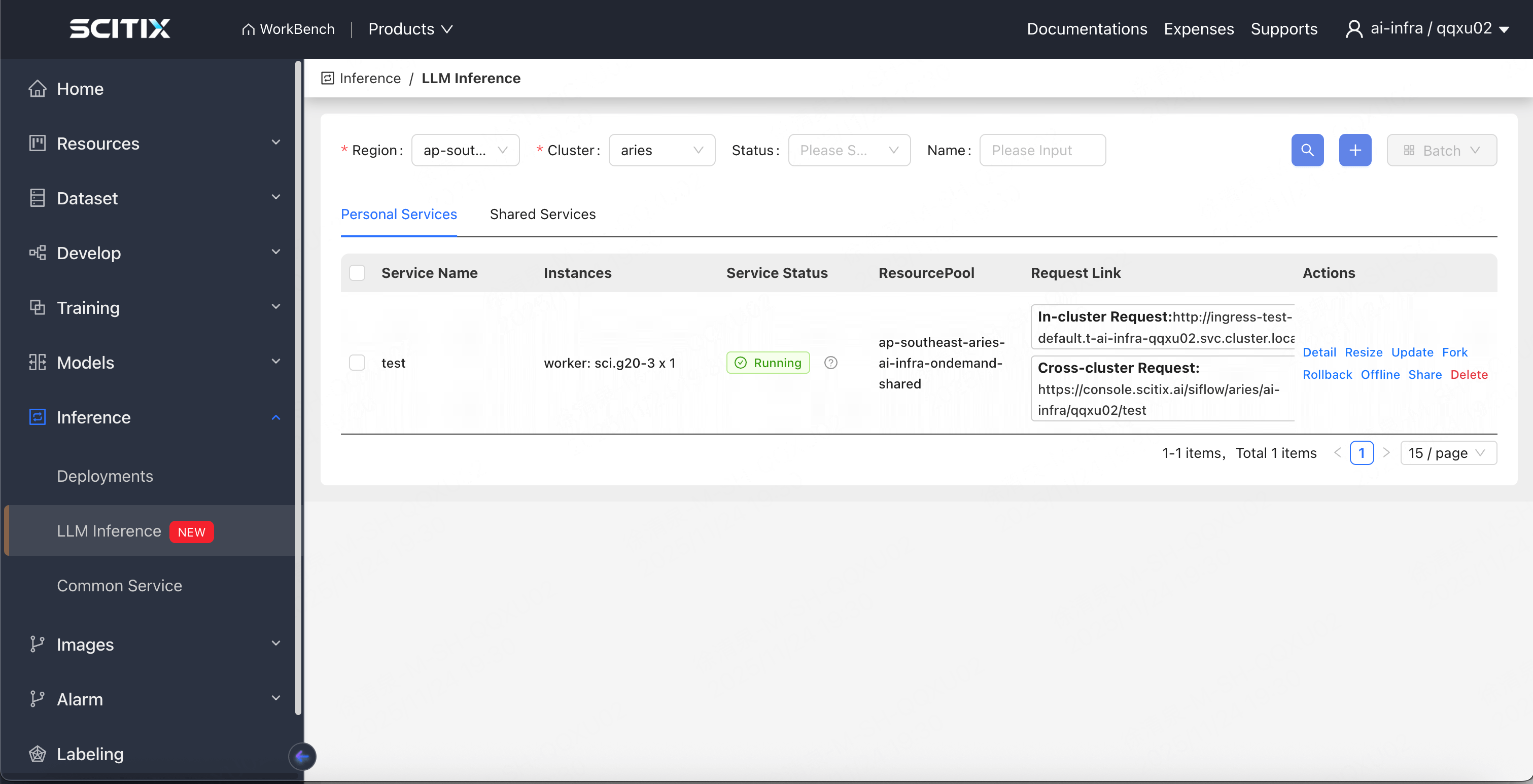
服务列表分为两个部分：

* 个人服务：普通用户可以查看自己的服务，而管理员用户可以查看当前租户下的所有服务
* 共享列表：显示其他用户共享的服务

服务状态：显示服务的运行状态。将鼠标悬停在问号上可查看服务状态的详细说明

操作项：

* 搜索：可以按服务名称和状态进行搜索。服务名称支持模糊匹配
* 新建：创建服务
* 批量操作：批量删除 / 上线 / 下线

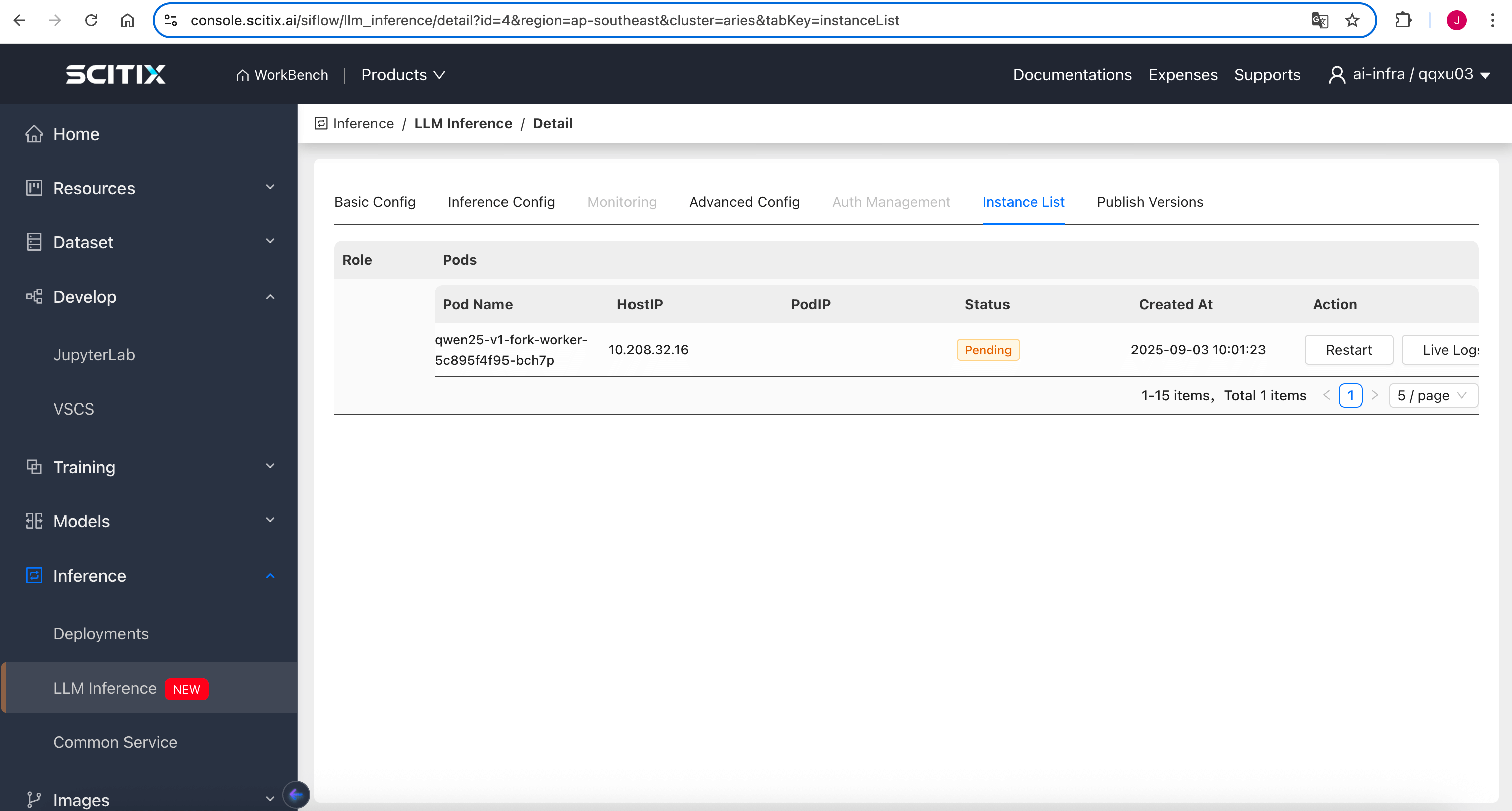
### 查看实例列表

实例列表按角色分组显示服务实例，并允许您重建实例、查看实例日志和监控实例指标

<img src="https://mintcdn.com/siflow/ntzNiCADsREJ4Kfh/products/siverse/media/llm/llm4.png?fit=max&auto=format&n=ntzNiCADsREJ4Kfh&q=85&s=8992712ab06d680ee613f2a9c5a777ce" alt="图片" width="3012" height="1616" data-path="products/siverse/media/llm/llm4.png" />

### 服务伸缩

在服务列表中点击"伸缩"以执行垂直伸缩（每个节点的资源配置）和水平伸缩（增加或减少副本数量）

<img src="https://mintcdn.com/siflow/ntzNiCADsREJ4Kfh/products/siverse/media/llm/llm5.png?fit=max&auto=format&n=ntzNiCADsREJ4Kfh&q=85&s=97ac05111ca46ec416d0296c72b8c7a6" alt="图片" width="3140" height="1720" data-path="products/siverse/media/llm/llm5.png" />

### 自定义监控告警

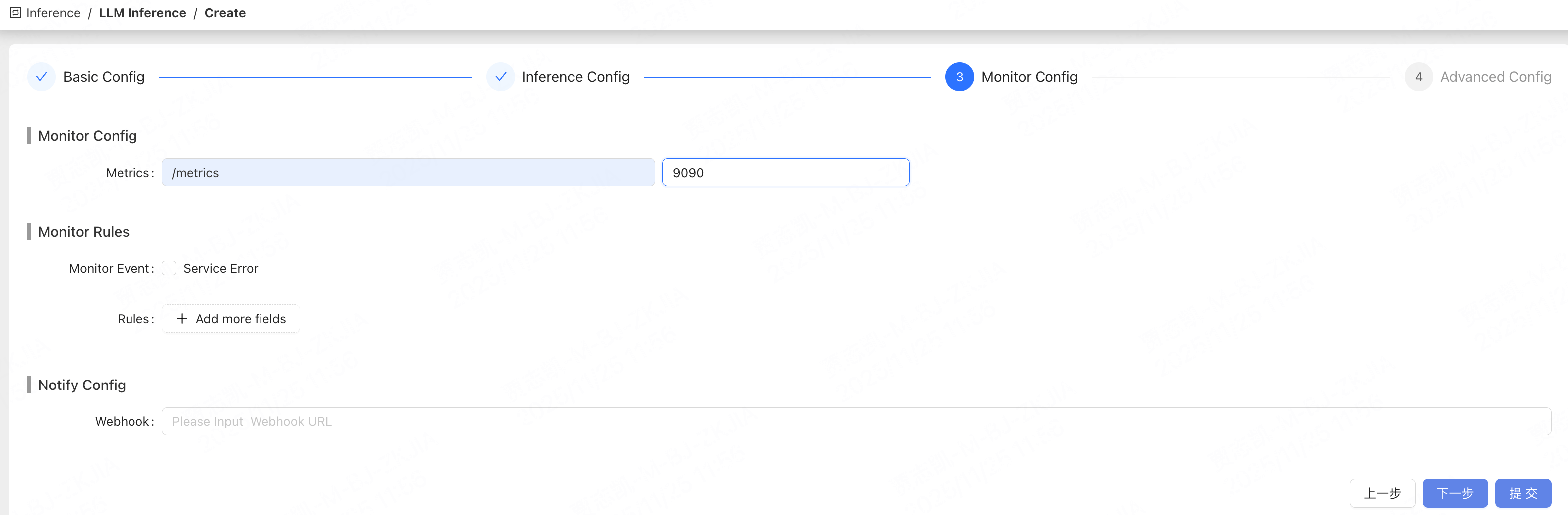
* 指标端口和路径配置；指标将通过此接口收集到 Prometheus

部分引擎默认端口：

* vLLM 默认端口 8000

* Sglang 默认端口 30000

* PD 分离后，Sglang 的默认端口为 30000，指标默认端口为 9090

  <img src="https://mintcdn.com/siflow/ntzNiCADsREJ4Kfh/products/siverse/media/llm/llm6.png?fit=max&auto=format&n=ntzNiCADsREJ4Kfh&q=85&s=7ad1c8b1f73bb102fe5bed9177d494fe" alt="图片" width="3012" height="536" data-path="products/siverse/media/llm/llm6.png" />

* 监控规则：目前仅支持 Service Error 告警

  <img src="https://mintcdn.com/siflow/ntzNiCADsREJ4Kfh/products/siverse/media/llm/llm7.png?fit=max&auto=format&n=ntzNiCADsREJ4Kfh&q=85&s=b074b09163235d93271400bf3de3f634" alt="图片" width="3148" height="1034" data-path="products/siverse/media/llm/llm7.png" />

* 通知方式：需要在告警中心订阅

在告警中心通过选择 inference 和 service error 来订阅告警

## 权限管理

### 共享服务

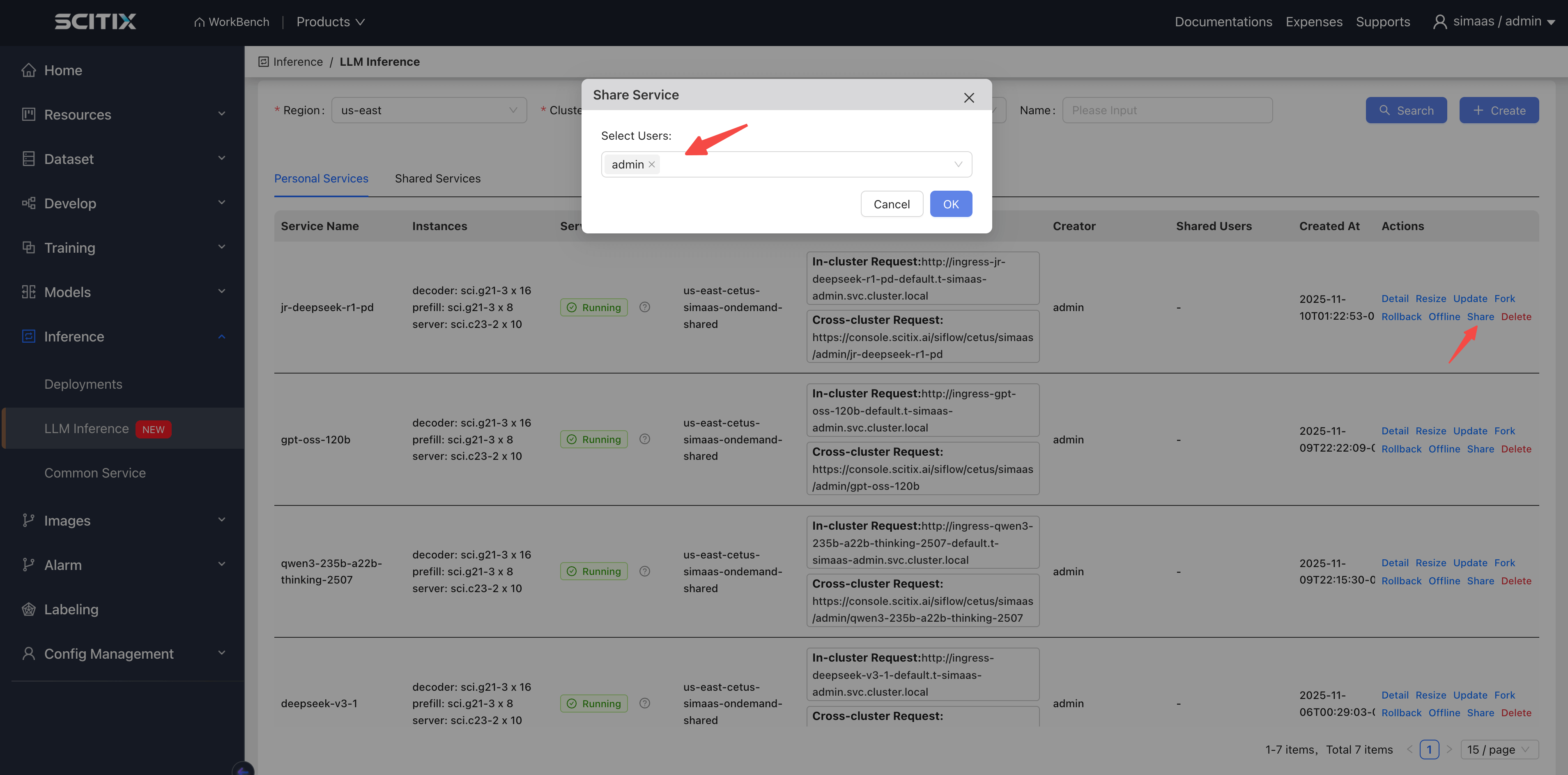
* 点击列表中对应推理服务旁边的共享按钮，选择要共享的用户，然后提交。指定用户随后即可在共享列表中看到该推理服务。
* 若要取消共享，点击共享，并移除对应的用户

  <img src="https://mintcdn.com/siflow/ntzNiCADsREJ4Kfh/products/siverse/media/llm/llm8.png?fit=max&auto=format&n=ntzNiCADsREJ4Kfh&q=85&s=3130040dc076d5336048ebeadd68241b" alt="图片" width="3818" height="1886" data-path="products/siverse/media/llm/llm8.png" />